

With the new Microsoft Agents SDK (GA since Build 2025), there is now a direct API path to surface a Custom Engine Agent in Copilot Chat – Your agent connects via two API connections, and Copilot Chat becomes another delivery channel for your existing AI backend.
This post walks through the architecture, the security model, a working lab setup, and how Microsoft Agent 365 fits into the governance picture.
Architecture
The integration consists of two API connections and a thin bridge layer built on the Agents SDK.
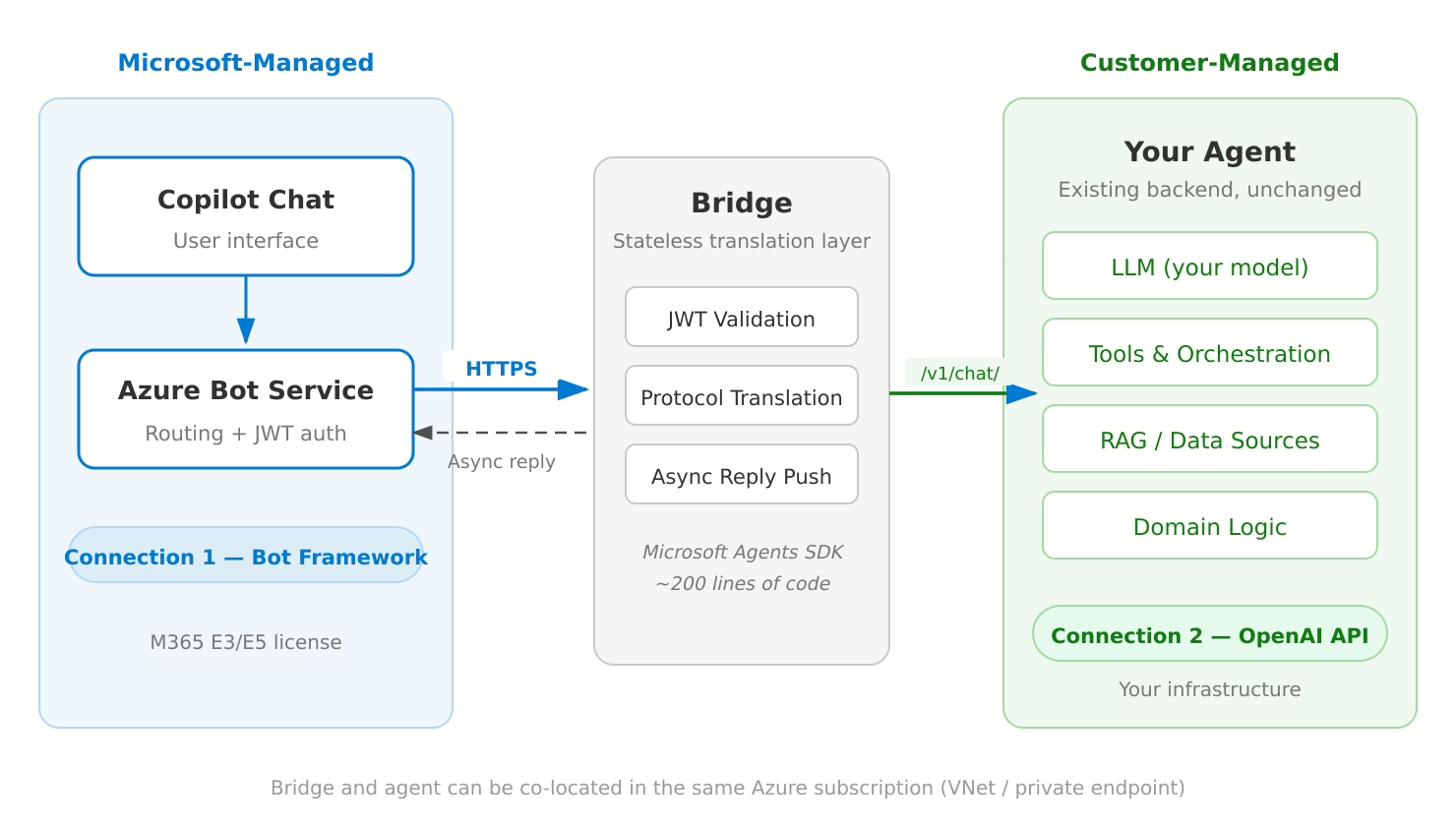
Three layers:
- Microsoft-Managed — Copilot Chat (user interface) and Azure Bot Service (message routing + JWT authentication)
- Bridge — A stateless translation layer (~200 lines of code) built on the Microsoft Agents SDK
- Customer-Managed — Your agent backend with its own LLM, tools, RAG pipelines, and domain logic
Connection 1 — Microsoft → Bridge (Bot Framework Protocol)
When a user sends a message in Copilot Chat, Azure Bot Service delivers it as a JWT-signed HTTPS request to the bridge. The bridge validates the JWT against Microsoft’s published signing keys and returns HTTP 200 immediately. Replies are pushed back asynchronously through the Bot Connector REST API.
This decoupling is critical: Azure Bot Service enforces a hard 15-second timeout on the inbound connection. Any agent that needs more than 15 seconds to respond (and most real agents do) must use this async pattern. The Agents SDK handles the complexity — you extract a conversationReference while the TurnContext is still valid, then use adapter.continueConversation() to push the reply later.
Connection 2 — Bridge → Your Agent (OpenAI-compatible API)
The bridge translates the Bot Framework message into a standard OpenAI-format chat completion request (/v1/chat/completions) and forwards it to your agent backend. Any service that exposes this endpoint works — no proprietary SDK or protocol required. Your agent processes the request with its full capabilities, and the bridge delivers the response to the user via Connection 1.
Key point: The bridge is a thin, stateless translation layer. It does not contain any AI logic — it simply translates between Bot Framework and the OpenAI API format. Your agent’s existing architecture, models, and orchestration remain completely untouched.
The Microsoft Agents SDK
The bridge is built on @microsoft/agents-hosting — the Microsoft Agents SDK, which went GA at Build 2025 and is the official successor to the Bot Framework SDK (end of support: December 2025).
The Agents SDK handles all the heavy lifting:
- JWT validation against Microsoft’s signing keys
- Activity parsing and conversation management
- The async reply pattern via the Bot Connector API
- Multi-channel support (Copilot Chat, Teams, Webchat, Slack, and more)
The SDK is AI-agnostic — it doesn’t care what model or orchestration framework your agent uses. OpenAI, Azure OpenAI, Anthropic, open-source models, LangChain, Semantic Kernel, custom orchestration — the SDK just handles the Microsoft platform integration.
npm: @microsoft/agents-hosting (current stable: v1.3.1)
GitHub: microsoft/Agents-for-js
What Changes in Your Agent Backend?
Very little. The requirements are:
- Expose an OpenAI-compatible
/v1/chat/completionsendpoint (or any HTTP endpoint — the bridge is customizable) - Accept a messages array (conversation history) and return a response
- Handle requests that may take 5–60 seconds (the bridge manages the timeout toward Microsoft asynchronously)
If your agent already has an API layer, the integration work is entirely on the bridge and the Azure/M365 configuration side.
Security Model
The integration follows Microsoft’s standard security model for bot-based agents:
- Inbound authentication: Every request from Azure Bot Service is JWT-signed. The bridge validates signatures against Microsoft’s published signing keys using the Agents SDK. Unauthenticated requests are rejected.
- Tenant isolation: The Entra ID app registration is configured as SingleTenant (
AzureADMyOrg). Only your M365 tenant can communicate with the bot — no cross-tenant access. - Ingress: The bridge exposes a single HTTPS endpoint. In Azure, this is handled natively via Azure Container Apps or AKS with managed TLS.
- Agent backend isolation: The connection between bridge and agent is internal (VNet, private endpoint, or co-located). The agent backend is never exposed to the internet.
For production, the bridge would run in your Azure subscription using Managed Identity instead of client secrets, with Azure Key Vault for credential management.
Lab Setup — Validated with OpenClaw
I tested the full integration end-to-end on a local Linux VM using OpenClaw as the agent backend. The bridge and a Cloudflare Tunnel run as Docker Compose services on the same VM.
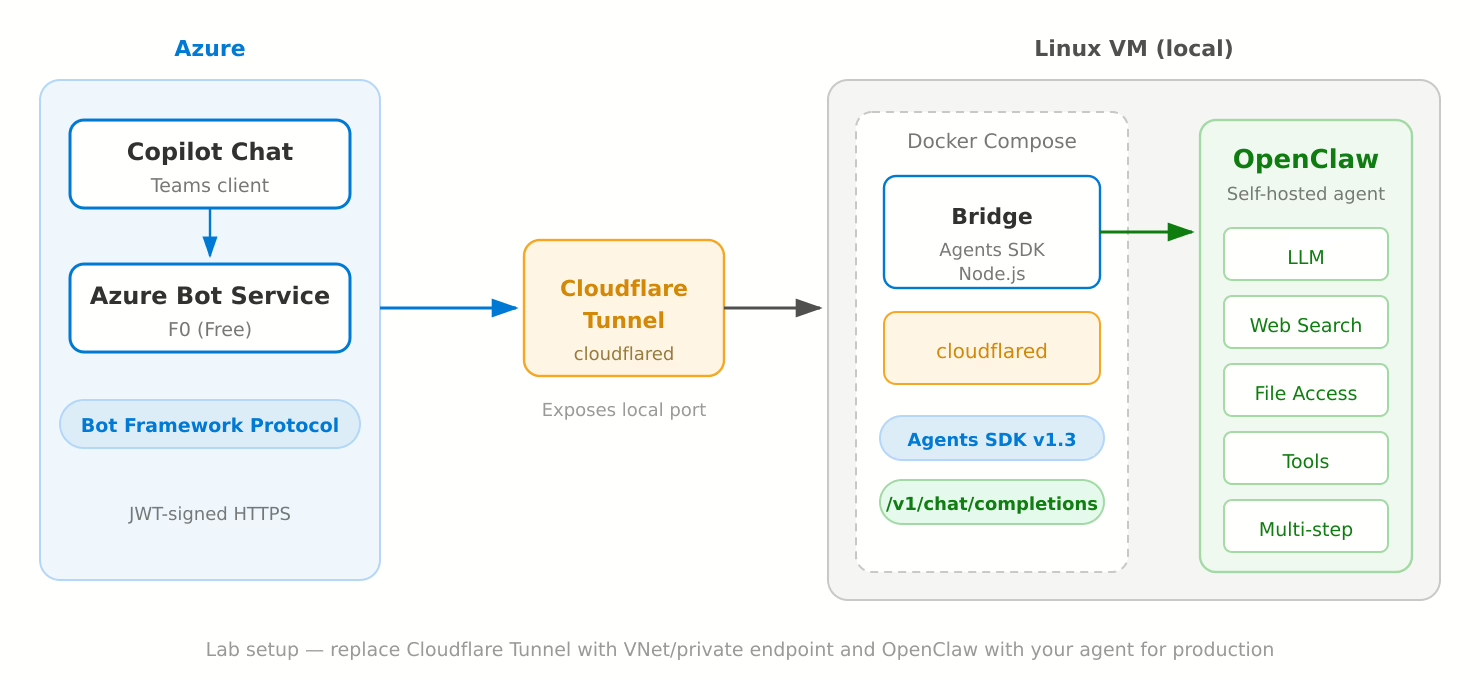
Components:
- Azure Bot Service (F0) — Free tier, message routing and JWT auth
- Cloudflare Tunnel — Exposes the bridge’s local port to Azure Bot Service (no public IP needed)
- Bridge — Node.js, Agents SDK, ~200 lines of code, running in Docker
- OpenClaw — Self-hosted agent running on the same VM, receiving requests via
/v1/chat/completions
OpenClaw runs fully isolated on the VM with no access to Microsoft 365 data — it simply receives prompts via the bridge and returns responses. Any agent with an OpenAI-compatible API would work identically in this setup.
Results:
- The agent appears in Copilot Chat as a selectable agent — indistinguishable from any first-party agent
- Full conversations work end-to-end, including long-running responses (30+ seconds) with multi-step tool use
- Typing indicators keep the user informed while the agent processes
- The same deployment works in both Copilot Chat and Microsoft Teams simultaneously
The key takeaway: the bridge doesn’t care what the agent does internally. Replace OpenClaw with your agent and the integration model is the same.
For production, replace the Cloudflare Tunnel with a VNet/private endpoint in Azure, and Docker Compose with Azure Container Apps or AKS.
Deployment — Step by Step
Everything is done via Azure CLI — no Portal clicking required.
1. Entra ID App Registration + Service Principal
# Create app registration (SingleTenant)
az ad app create --display-name "MyCopilotAgent" --sign-in-audience AzureADMyOrg

# Create client secret
az ad app credential reset --id <APP_ID> --display-name "MyCopilotAgent" --years 2

# Create Service Principal (critical — without this, no tokens)
az ad sp create --id <APP_ID>

# Set App ID URI (must use botid- prefix for Copilot Chat)
az ad app update --id <APP_ID> --identifier-uris "api://botid-<APP_ID>"
2. Azure Bot Service
# Resource Group
az group create --name rg-copilot-agent --location westeurope

# Bot Registration (F0 = Free Tier)
az bot create \
  --resource-group rg-copilot-agent \
  --name my-copilot-agent \
  --kind registration \
  --sku F0 \
  --appid <APP_ID> \
  --app-type SingleTenant \
  --tenant-id <TENANT_ID>

# Set messaging endpoint
az bot update \
  --resource-group rg-copilot-agent \
  --name my-copilot-agent \
  --endpoint "https://agent.yourdomain.com/api/messages"
3. Enable Teams Channel + Accept Terms
One thing to watch out for: az bot msteams create enables the channel but does not accept the Terms of Service. Without accepted terms, the channel silently drops all messages — no error, no log entry.
# Enable Teams channel
az bot msteams create --name my-copilot-agent --resource-group rg-copilot-agent

# Accept Terms of Service (required!)
SUBSCRIPTION=$(az account show --query id -o tsv)
az rest --method PATCH \
  --url "https://management.azure.com/subscriptions/$SUBSCRIPTION/resourceGroups/rg-copilot-agent/providers/Microsoft.BotService/botServices/my-copilot-agent/channels/MsTeamsChannel?api-version=2022-09-15" \
  --body '{"properties":{"channelName":"MsTeamsChannel","properties":{"isEnabled":true,"acceptedTerms":true}},"location":"global"}'
4. Bridge Service
The bridge is ~200 lines of Node.js built on @microsoft/agents-hosting. It validates the inbound JWT, translates the message to OpenAI format, calls your agent, and pushes the reply back asynchronously. Stateless, no persistent storage needed.
5. Teams App Manifest + Upload
The manifest registers the bot as a Custom Engine Agent. The critical fields are the "copilot" scope and the copilotAgents.customEngineAgents section:
{
  "manifestVersion": "1.22",
  "bots": [{
    "botId": "<APP_ID>",
    "scopes": ["copilot", "personal", "team", "groupChat"]
  }],
  "copilotAgents": {
    "customEngineAgents": [{ "type": "bot", "id": "<APP_ID>" }]
  },
  "webApplicationInfo": {
    "id": "<APP_ID>",
    "resource": "api://botid-<APP_ID>"
  }
}
# Package and upload
cd appPackage && zip appPackage.zip manifest.json color.png outline.png

# Upload via Graph API
curl -X POST "https://graph.microsoft.com/v1.0/appCatalogs/teamsApps" \
  -H "Authorization: Bearer <TOKEN>" \
  -H "Content-Type: application/zip" \
  --data-binary @appPackage.zip
After upload, the agent appears in Copilot Chat within minutes.
Platform Cost and Licensing
On the user side, the only requirement is a standard Microsoft 365 E3 or E5 license. Users access the agent through Copilot Chat, which is included in these subscriptions.
On the infrastructure side:
| Component | Cost |
|---|---|
| Azure Bot Service F0 (Free) | 10,000 messages/month included |
| Azure Bot Service S1 (Standard) | $0.50 per 1,000 messages |
| Entra ID App Registration | Free |
| Bridge (container) | Standard compute cost |
| Agent backend | Your existing cost |
The agent backend is a cost you already carry today regardless of the Copilot Chat integration.
Scaling
The architecture scales horizontally:
- Bridge: Stateless — add replicas with autoscaling (Azure Container Apps). For shared state (conversation references), move to Redis or Cosmos DB.
- Bot Service: Upgrade from F0 to S1. At enterprise scale (10,000–20,000 DAU, ~5 messages each), expect 1.5–3 million messages per month.
- Agent backend: Sized independently. The bridge imposes no constraints.
Governance — Where Microsoft Agent 365 Fits In
Once your Custom Engine Agent is published to Copilot Chat, it enters the scope of Microsoft’s governance stack. There are two layers:
Copilot Control System (GA)
The Copilot Control System in the M365 admin center provides:
- Agent Registry — Your agent appears alongside all other agents in the tenant, with metadata on usage, sessions, and status
- Access controls — Admins restrict who can use the agent (all users, specific groups, or no one)
- Agent lifecycle — Approve, publish, block, or remove agents
- Agent policies — Automated rules (e.g., expire unused agents after 90 days, block risky agents)
On the compliance side, Microsoft Purview covers the interaction layer:
- Audit — All prompts and responses are logged
- eDiscovery — Search and legal hold on agent interactions
- DLP — Prevent processing of sensitive data in prompts (E5)
- Retention — Policies for agent interaction data
- Communication Compliance — Alert on policy violations (E5)
Microsoft Agent 365 (Public Preview)
Microsoft Agent 365, announced at Ignite 2025, is the broader control plane for agents at enterprise scale — regardless of where they are built. It adds:
- Centralized registry across all agent sources (Copilot Studio, Agents SDK, AI Foundry, third-party)
- Visualization — Real-time monitoring of agent behavior and performance
- Interoperability — Equip agents with data and simplify human-agent workflows
- Security — Threat detection and data protection guardrails via Defender and Entra integration
Custom Engine Agents can optionally integrate the Agent 365 SDK for deeper governance. Additionally, Microsoft Entra Agent ID (Preview) provides first-class identities for agents with conditional access and lifecycle management.
What This Means for Agents That Don’t Access M365 Data
This is the interesting nuance. A Custom Engine Agent like the one described in this post doesn’t read from SharePoint, Exchange, or any M365 data source. The agent runs fully isolated — the M365 platform is purely a delivery channel.
Governance still applies, but at the interaction layer:
- Prompts and responses flowing through Copilot Chat are subject to Purview audit, DLP, eDiscovery, and retention
- The agent appears in the Agent Registry and is managed by admin policies
- The underlying AI pipeline (your model, your tools, your data sources) remains your responsibility
This is actually a clean separation: Microsoft governs the surface, you govern the backend.
Pitfalls and Error Catalog
During implementation, I encountered several issues worth documenting:
| # | Issue | Symptom | Fix |
|---|---|---|---|
| 1 | Missing Service Principal | Bot Service returns 401 on token requests | az ad sp create --id <APP_ID> |
| 2 | Wrong App ID URI format | Custom Engine Agent registration fails | Must be api://botid-<APP_ID> |
| 3 | Terms not accepted | Teams channel silently drops all messages | Set acceptedTerms: true via REST API |
| 4 | Missing copilot scope | Agent doesn’t appear in Copilot Chat | Add "copilot" to bots[0].scopes in manifest |
| 5 | 15-second timeout | Long-running responses get dropped | Use async continueConversation() pattern |
| 6 | TurnContext proxy revocation | „Cannot perform on revoked proxy“ errors | Extract conversationReference before returning from handler |
Each of these cost significant debugging time. The async reply pattern (#5) deserves special attention: the bridge must return HTTP 200 immediately and push the response later via adapter.continueConversation().
Conclusion
Custom Engine Agents are a clean way to bring your own agent into Microsoft 365 Copilot Chat. The integration is entirely API-based, built on the Microsoft Agents SDK, and doesn’t require changes to your agent backend. The bridge layer is minimal, stateless, and straightforward to deploy.
The governance story is maturing quickly: the Copilot Control System handles the interaction layer today, and Microsoft Agent 365 is building toward a comprehensive control plane for all agents across the enterprise.
If you’re running an agent that already exposes an API, Copilot Chat becomes another delivery channel — alongside your existing interfaces — without any changes to your agent’s architecture.
The source code for the bridge and detailed deployment documentation are available on request.

Schreibe einen Kommentar