

Updated: March 2026
Since early 2026, Microsoft 365 Copilot has been expanding quickly with dedicated Word, Excel, and PowerPoint Agents in chat and broader Agent Mode experiences directly inside the apps.
This article gives you a practical, current-state overview of what to expect across both surfaces:
- Chat experiences (Standalone Agents): create new files from Copilot.
- In-app experiences (Agent Mode): edit and refine content directly in Word, Excel, and PowerPoint.
- Admin controls: what needs to be enabled, where Frontier matters, and where standard rollout is enough.
One-line scope: Standalone Agents = create new files in Copilot. Agent Mode = improve the file that is already open.
Table of contents
- 1) What is what? (Standalone Agents vs. Agent Mode)
- 2) What users actually see
- 3) What admins must configure (and what is optional)
- 4) Recommended rollout: Pilot → Scale
- Sources (official)
Agent Matrix
Legend: Status → 🟢 GA · 🔵 GA rollout · 🟡 Beta/Frontier | Anthropic → ✅ required · ⚠️ optional · ❌ not required
| Agent | Where | Status | Anthropic | License | Docs |
|---|---|---|---|---|---|
| 🧩 Standalone Agents (Copilot app) | |||||
| 🟧 PowerPoint-Agent | Copilot app (Tools / Agents) | 🔵 GA rollout | ✅ Required | Copilot Chat ² + M365 Copilot | Support · Learn |
| 🟩 Excel-Agent | Copilot app (Tools / Agents) | 🔵 GA rollout | ✅ Required | Copilot Chat ² + M365 Copilot | Support · Learn |
| 🟦 Word-Agent | Copilot app (Tools / Agents) | 🔵 GA rollout | ✅ Required | Copilot Chat ² + M365 Copilot | Support · Learn |
| 🛠️ In-app Agent Mode (inside Office apps) | |||||
| 📊 InApp-Agent (Excel) | Excel app (Copilot pane) | 🟢 GA | ⚠️ Optional | Copilot Chat ² + M365 Copilot | Excel support |
| 📽️ PowerPoint in App | PowerPoint app (Copilot pane) | 🟡 Beta (Frontier) | ❌ Not required | M365 Copilot only | PowerPoint Frontier |
| 📝 Word in App | Word app (Copilot pane) | 🟢 GA | ❌ Not required | Copilot Chat ² + M365 Copilot ¹ | Word support |
¹ Since February 2026, Copilot Chat users have standard access to Agent Mode in Word with web grounding. M365 Copilot users get priority access with web + work grounding.
² Copilot Chat is included at no extra cost in Microsoft 365 E3, E5, Business Basic, Business Standard, and Business Premium. Microsoft 365 Copilot is a separate paid add-on. See eligible plans.
1) What is what?
Standalone Agents (new-file flow)
- Main job: Create a new Word/Excel/PowerPoint file from Copilot chat.
- Where users start: Microsoft 365 Copilot app → Tools / Agents.
- Admin prerequisite: Anthropic access must be enabled for these standalone agents.
- Best for: Blank-page start and first draft generation.
Agent Mode (in-app flow)
- Main job: Edit and improve the currently open file.
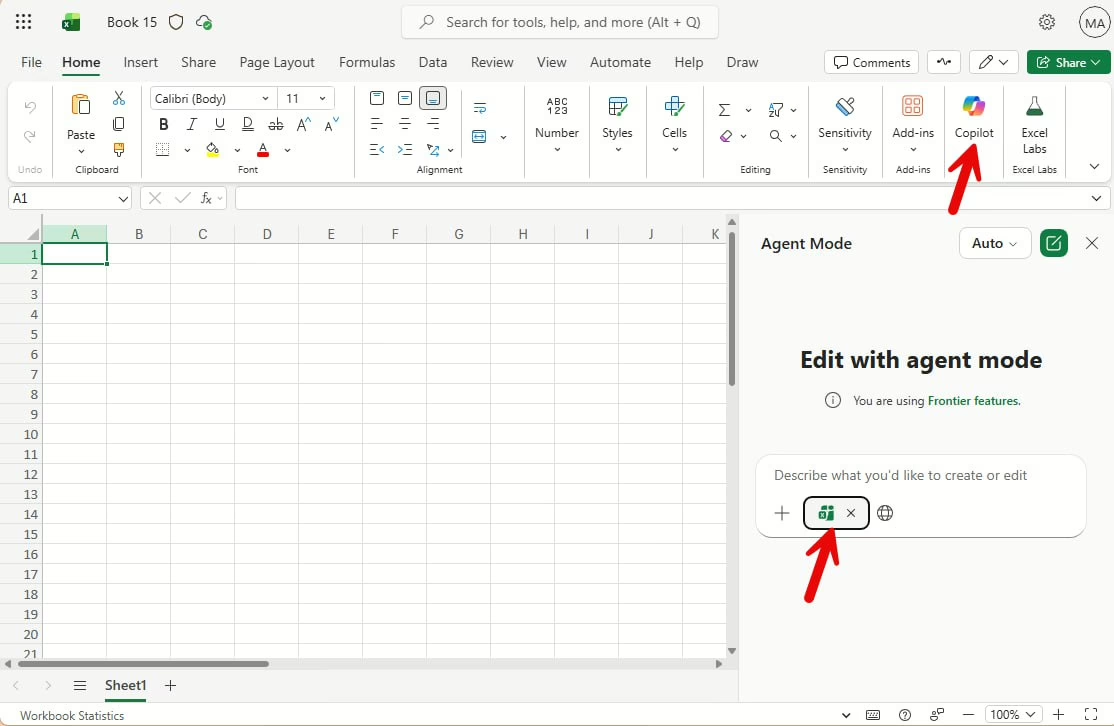
- Where users start: Word/Excel/PowerPoint Copilot pane → Tools → Agent Mode.
- Admin prerequisite: Standard Agent Mode does not require Frontier.
- Best for: Rework, restructuring, and polishing existing content.
Quick takeaway: Standalone Agents = create new files. Agent Mode = improve the file that is already open.
Why this matters: Teams often treat both as one feature. They are not. Different entry points, different controls, different rollout risks.
2) What users actually see
A) Standalone Agents in the Copilot app (new-file flow)
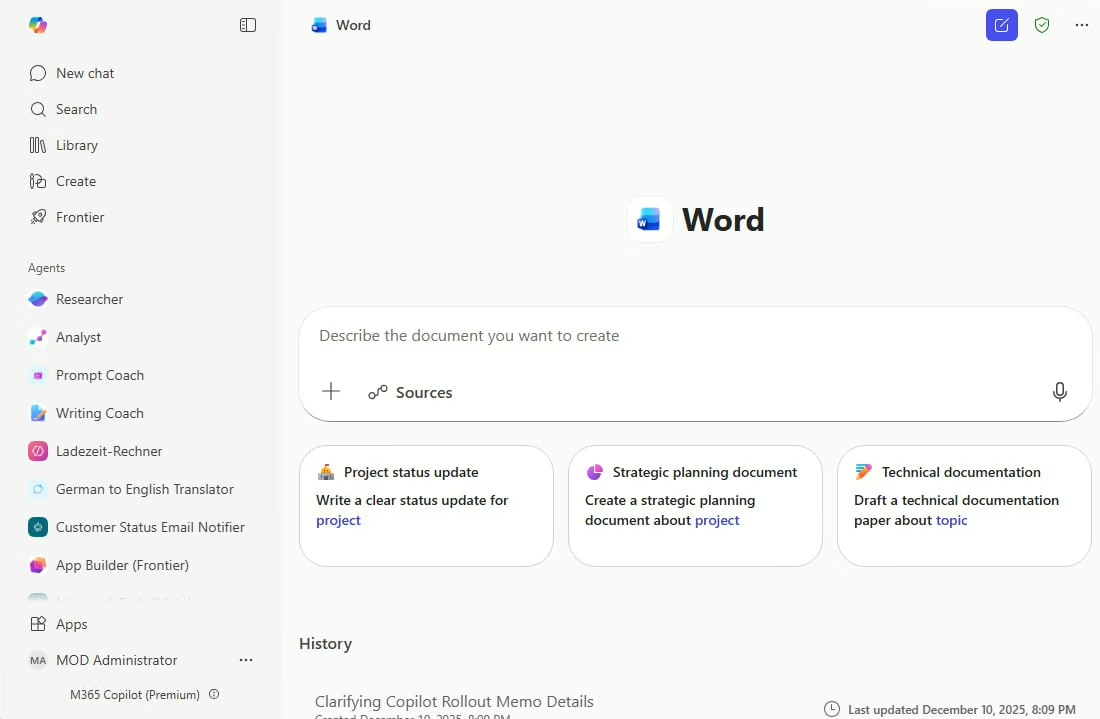
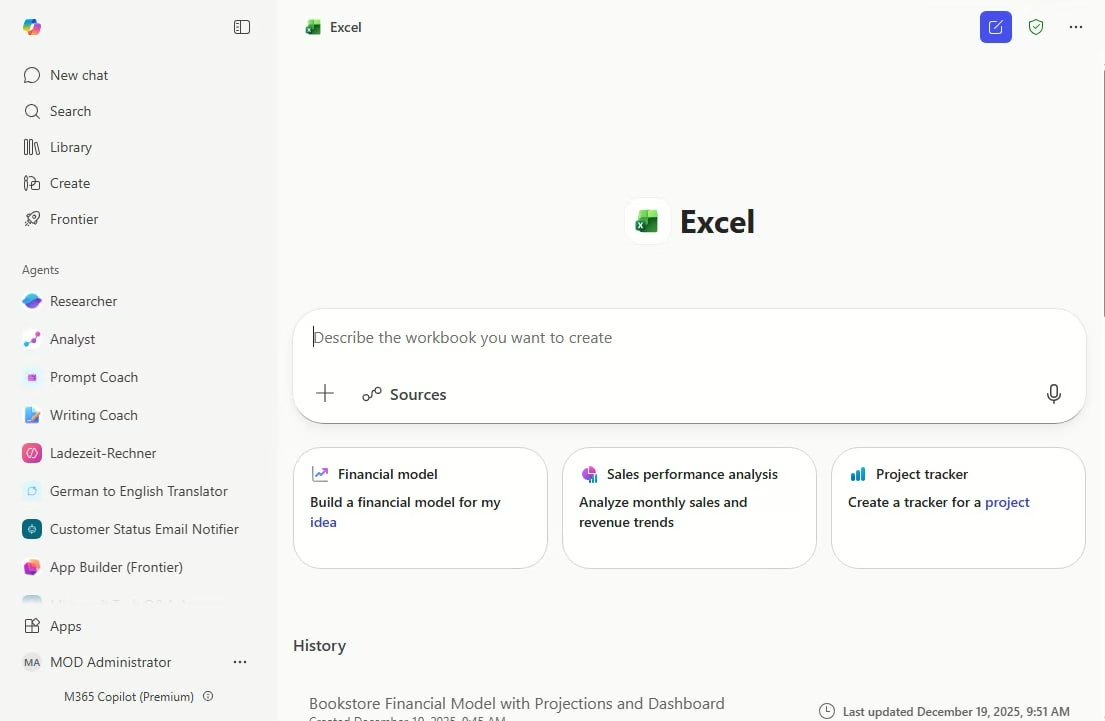
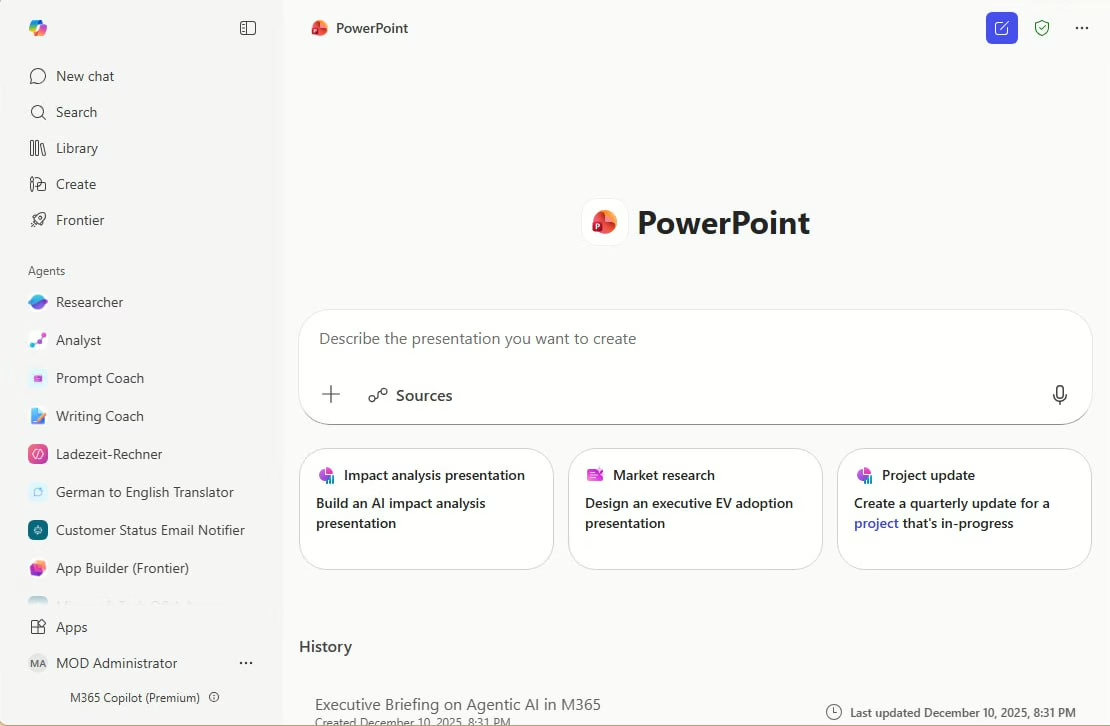
Users open Copilot, pick Word/Excel/PowerPoint Agent, describe what they need, and receive a new file draft in OneDrive.
B) Agent Mode in Office apps (in-place editing flow)
Users open an existing file, switch to Agent Mode in the Copilot pane, and ask for multi-step edits (for example: restructure a workbook, rewrite sections, update formatting).
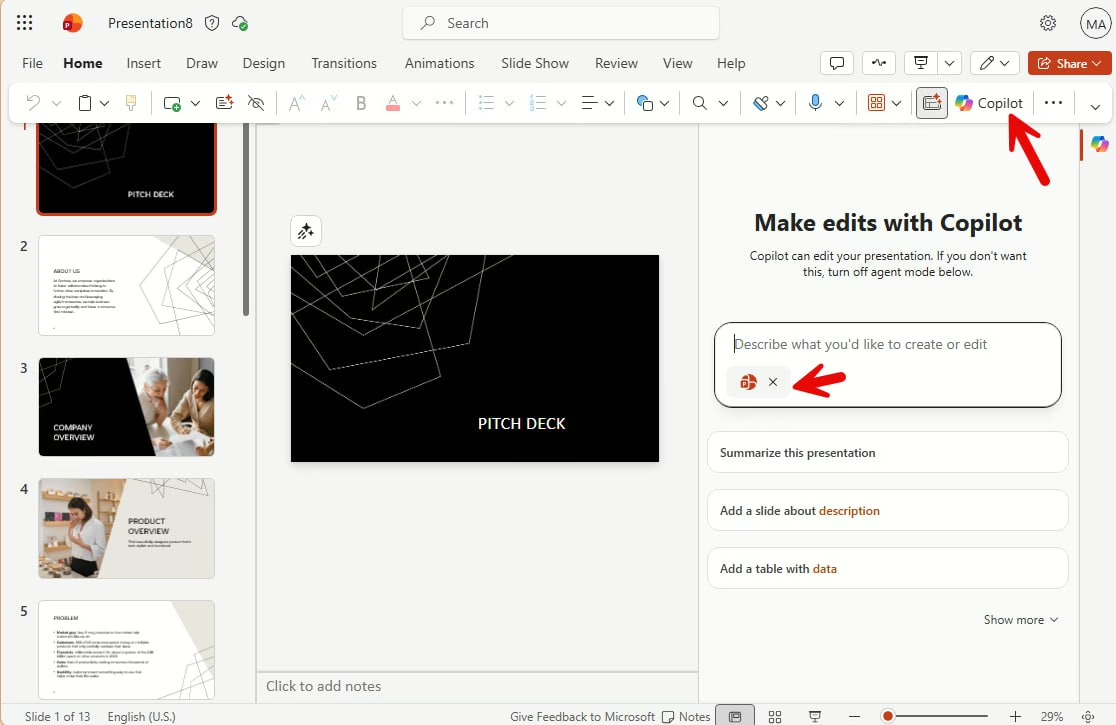
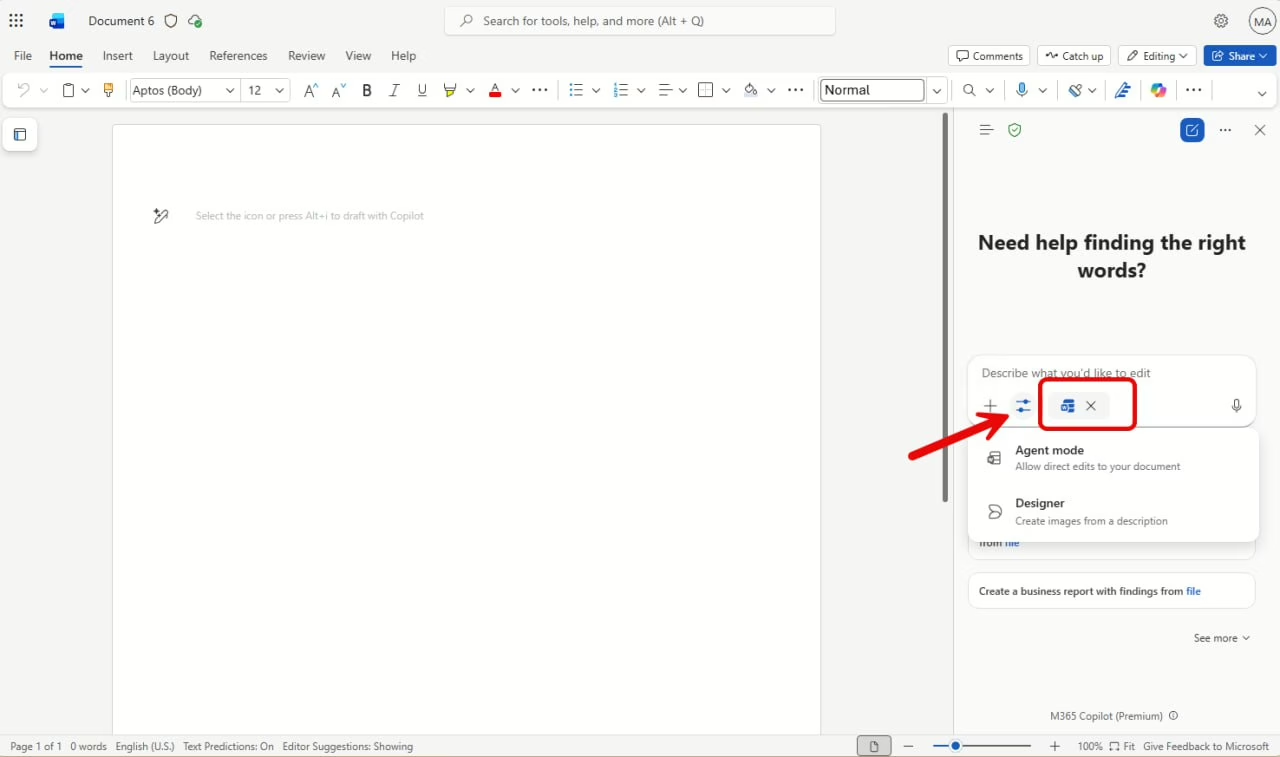
User guidance in one sentence: Start with Standalone Agents for “create from scratch”; switch to Agent Mode for “improve what I already have.”
3) What admins must configure
Three admin decisions control the rollout — Anthropic, Frontier, and agent visibility. The Agent Matrix above shows which agents need what. This section explains each toggle, the timeline, and provides a ready-to-use checklist.
3.1 — Rollout timeline
All dates from the Microsoft 365 Roadmap and official announcements. Check the roadmap for the latest status.
| Agent | Frontier / Preview | GA rollout start | Current status | Roadmap ID |
|---|---|---|---|---|
| 🛠️ In-app Agent Mode | ||||
| Agent Mode in Excel | Oct 2025 (Web, Frontier) | Dec 2025 (Web) · Jan 2026 (Desktop) · Feb 2026 (Copilot Chat) | ✅ GA | 542182, 543242 |
| Agent Mode in Word | Oct 2025 (Frontier) | Nov 2025 (M365 Copilot) · Feb 2026 (Copilot Chat) | ✅ GA | 543241 |
| Agent Mode in PowerPoint | Nov 2025 (Frontier) | Feb 2026 (Web, planned) | 🔄 In development | 548646 |
| 🧩 Standalone Agents (Copilot app) | ||||
| Word Agent | Nov 2025 (Ignite, Frontier) | Feb 2026 | 🔵 GA rollout | 543420 |
| Excel Agent | Nov 2025 (Ignite, Frontier) | Feb 2026 | 🔵 GA rollout | 543422 |
| PowerPoint Agent | Nov 2025 (Ignite, Frontier) | Feb 2026 | 🔵 GA rollout | 543421 |
Key notes:
- Agent Mode in Excel was first to GA (Dec 2025 Web, Jan 2026 Desktop). Extended to Copilot Chat users from Feb 2026 (543242).
- Agent Mode in Word went GA at Ignite (Nov 2025) for M365 Copilot users, then expanded to Copilot Chat users in Feb 2026 (543241).
- Agent Mode in PowerPoint remains Frontier-only. GA targeted for Feb 2026 on Web (548646).
- Standalone Agents were announced at Ignite (Nov 2025) and started GA rollout in Feb 2026.
⚠️ Licensing expansion: The roadmap entries for Agent Mode in Word (543241) and PowerPoint (548646) explicitly state: „Available to Copilot Chat users (without a Microsoft 365 Copilot license).“ Word already completed this expansion (Feb 2026). PowerPoint will follow at GA.
Sources: Microsoft 365 Roadmap · Ignite 2025 announcement
3.2 — Anthropic subprocessor toggle
What it controls: Whether Anthropic’s Claude models are available as a Microsoft subprocessor. The standalone agents require this. Agent Mode in Excel optionally uses it for the Claude model picker. Word and PowerPoint Agent Mode do not depend on it.
Where to find it:
- Microsoft 365 admin center → Copilot → Settings
- Data access section → AI providers operating as Microsoft subprocessors
- Toggle ON or OFF per your policy decision
Regional defaults:
| Region | Default | Admin action |
|---|---|---|
| Commercial (most regions) | ON | Only if you want to disable |
| EU / EFTA / UK | OFF | Must explicitly enable |
| Government / Sovereign clouds | Unavailable | No toggle available |
If disabled: Standalone Word/Excel/PowerPoint agents disappear from the Copilot app. Claude model selection in Excel Agent Mode becomes unavailable. (Source)
Compliance note: Anthropic models are currently excluded from the EU Data Boundary. EU/EFTA/UK customers should evaluate this before enabling.
3.3 — Frontier toggle
What it controls: Access to preview/experimental capabilities that Microsoft labels „Frontier.“
Where to find it: Microsoft 365 admin center → Copilot → Settings → Frontier section → Enable/disable per user group.
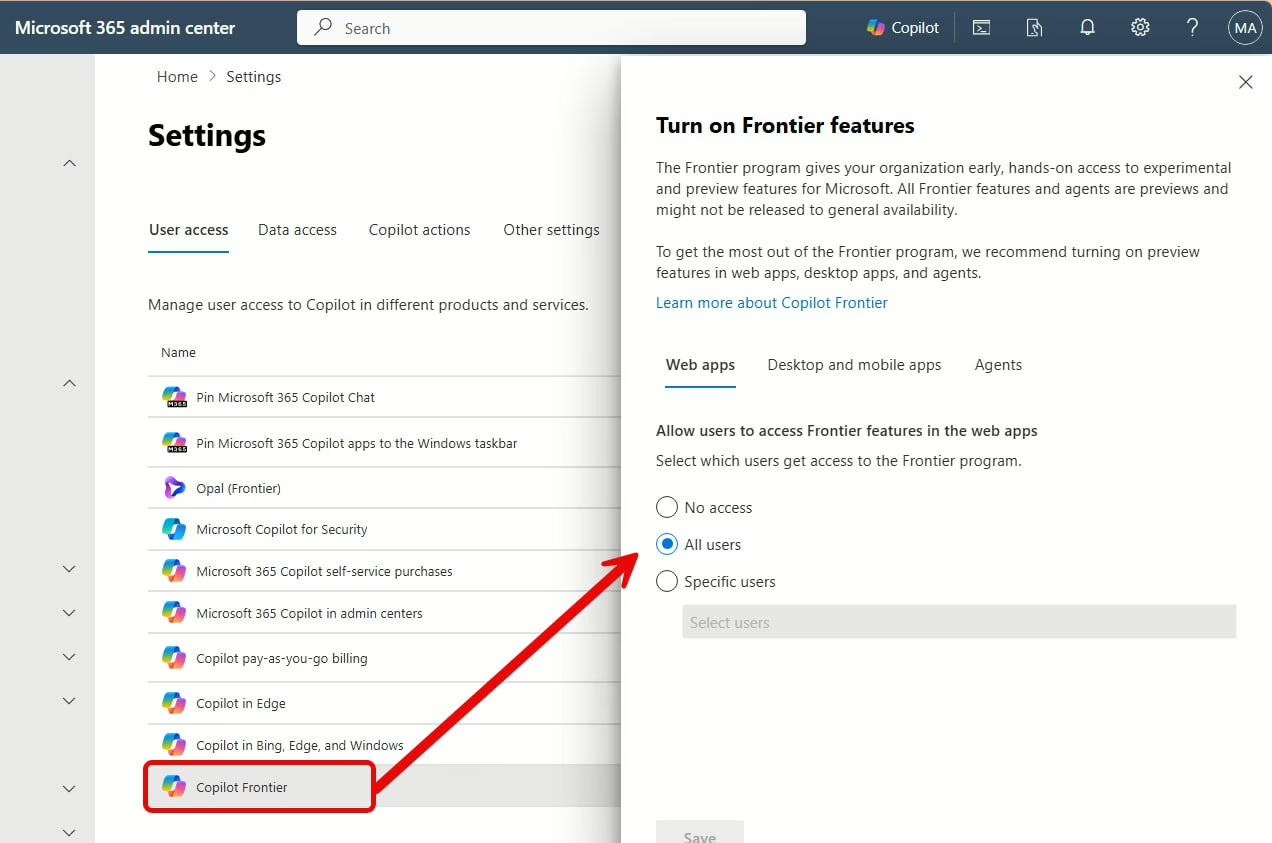
When you actually need Frontier:
| Scenario | Frontier required? | Details |
|---|---|---|
| Standalone Agents (Copilot app) | ❌ No | Standard rollout, gated by Anthropic toggle |
| Agent Mode in Excel (baseline) | ❌ No | GA, standard rollout |
| Agent Mode in Excel (preview features) | ✅ Yes | Frontier + Insiders Beta Channel on Windows |
| Agent Mode in Word | ❌ No | GA, fully rolled out |
| Agent Mode in PowerPoint | ✅ Yes | Frontier only. Windows: Insiders Beta Channel. Web: Frontier program. |
Recommendation: Stay on the standard rollout path unless you need PowerPoint Agent Mode or Excel preview features. Enable Frontier for a scoped pilot group only. (Frontier program info)
3.4 — Agent visibility
What it controls: Who can see, use, and share agents in the Copilot app. This applies to standalone agents only — not the in-app Agent Mode experiences.
Where to find it:
- Microsoft 365 admin center → Copilot → Agents
- Review the three toggles: Microsoft-built, Org-built, Third-party agents
- Assign or block agents per user/group
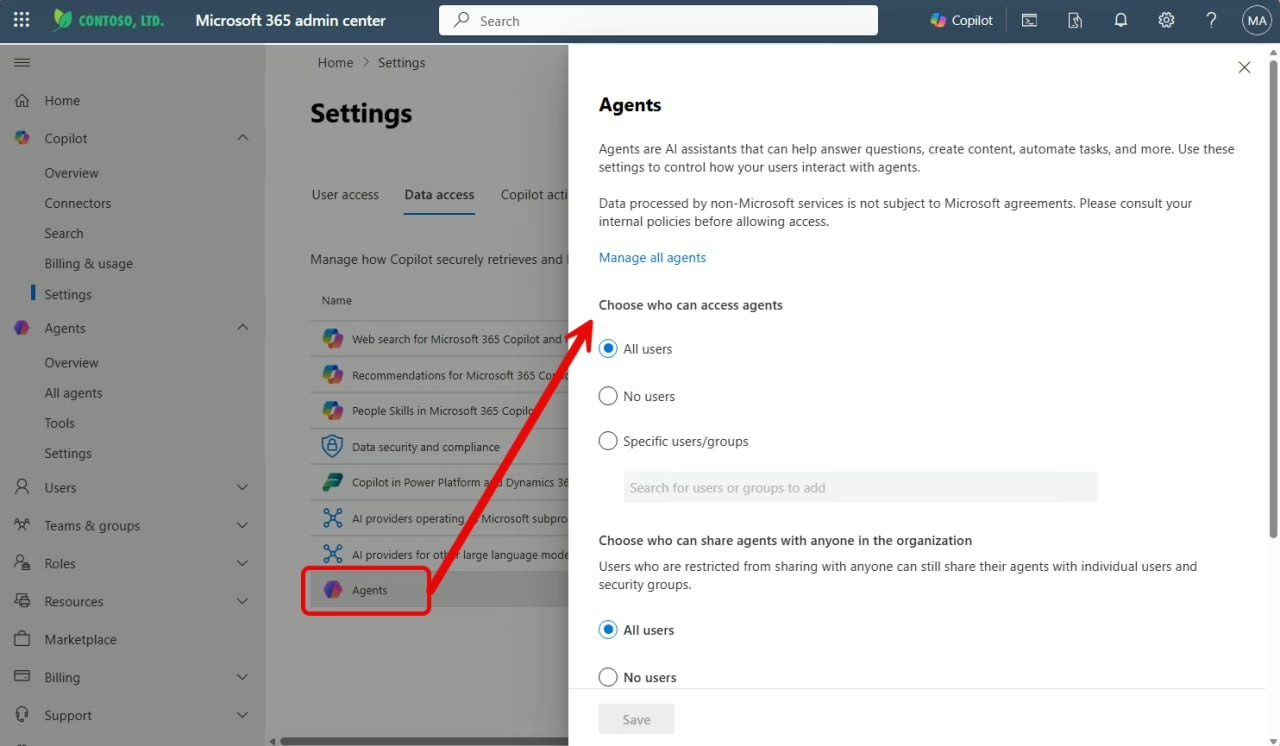
Key controls:
- Microsoft-built agents — includes the Word/Excel/PowerPoint standalone agents. ON by default. (Source)
- Org-built agents — agents created with Agent Builder or Copilot Studio.
- Third-party agents — external marketplace agents. Consider disabling initially.
3.5 — Admin checklist
| # | Action | Where | Why |
|---|---|---|---|
| 1 | Enable or disable Anthropic | Copilot → Settings → Data access → AI providers | Required for Standalone Agents. Optional for Claude in Excel. EU/EFTA/UK: OFF by default — opt in explicitly. |
| 2 | Enable or disable Frontier | Copilot → Settings → Frontier | Required only for PowerPoint Agent Mode and Excel preview features. Scope to a pilot group. |
| 3 | Review agent visibility | Copilot → Agents | Controls which standalone agents users can see. Microsoft-built agents are ON by default. |
| 4 | Verify license assignments | Users → Active users → Licenses | Standalone Agents: Copilot Chat or M365 Copilot. Agent Mode in Word: Copilot Chat (web) or M365 Copilot (web+work). Agent Mode in PPT: M365 Copilot only. |
| 5 | Set Insiders Beta Channel (if needed) | M365 Apps admin center → Update channel | Required for PowerPoint Agent Mode on Windows and Excel Frontier on Windows. |
| 6 | Run pilot test | — | Validate agents appear and work. Test both flows: new file (Standalone) and in-place edit (Agent Mode). |
Background: How Anthropic terms changed
For context: Anthropic moved from a separate legal construct to a Microsoft subprocessor model on January 7, 2026. This is the change many teams missed:
| Aspect | Legacy path (deprecated Jan 7, 2026) | Current model |
|---|---|---|
| Terms | Anthropic separate terms + Anthropic DPA | Microsoft Product Terms + Microsoft DPA |
| Governance | External-provider, separate legal construct | Anthropic as Microsoft subprocessor |
| Admin toggle | Legacy Anthropic toggle (deprecated) | „AI providers operating as Microsoft subprocessors“ |
| If disabled | Legacy path not used | Standalone agents disappear; Claude model picker unavailable |
Important for EU/EFTA/UK: If you previously opted in via the legacy toggle, you need to opt in again under the new subprocessor toggle — it resets to OFF by default in these regions. (Source)
4) Recommended rollout: Pilot → Scale
Phase 0 (prep, 1 week)
- Confirm target licenses and supported apps/channels.
- Decide Anthropic policy (enabled for all, selected groups, or not at all by region/compliance).
- Define content safety guardrails and user communication.
Phase 1 (pilot, 2–4 weeks)
- Pilot 50–200 users across at least 2 functions (for example Sales + Finance).
- Train users on the two flows: new file vs in-place edits.
- Enable Frontier only for a small test cohort if preview features are a real requirement.
Phase 2 (scale, ongoing)
- Expand by business unit with explicit owner per wave.
- Use agent inventory governance (allow/block/remove) as standard operating process.
- Review usage and quality feedback monthly; update enablement material every release cycle.
Simple KPI set: adoption rate, successful task completion, rework rate after generation, and policy/compliance incidents.
Sources (official)
- Microsoft Learn — Create files with Word, Excel, and PowerPoint Agents
- Microsoft Support — Get started with Word, Excel, and PowerPoint Agents
- Microsoft Support — Get started with Agent Mode in Excel, PowerPoint, and Word
- Microsoft Support — Agent Mode in Excel
- Microsoft Support — Agent Mode in Word
- Microsoft Support — Agent Mode in PowerPoint (Frontier)
- Microsoft Learn — Anthropic as a subprocessor for Microsoft Online Services
- Microsoft Learn — Connect to Anthropic’s AI models (legacy path and deprecation note)
- Microsoft Learn — Data, Privacy, and Security for Microsoft 365 Copilot
- Microsoft Learn — Manage Microsoft 365 Copilot scenarios
- Microsoft Learn — Manage Microsoft 365 Copilot agents in admin center
- Microsoft Learn — Share and manage agents built with Microsoft 365 Copilot
- Microsoft Learn — Agent Builder vs Copilot Studio (governance and licensing context)
- Microsoft Tech Community — Agent Mode in Excel GA on desktop
Note: Microsoft updates Copilot documentation frequently. Validate final behavior in your own tenant (license, region, channel, and rollout wave) before broad enablement.

Schreibe einen Kommentar